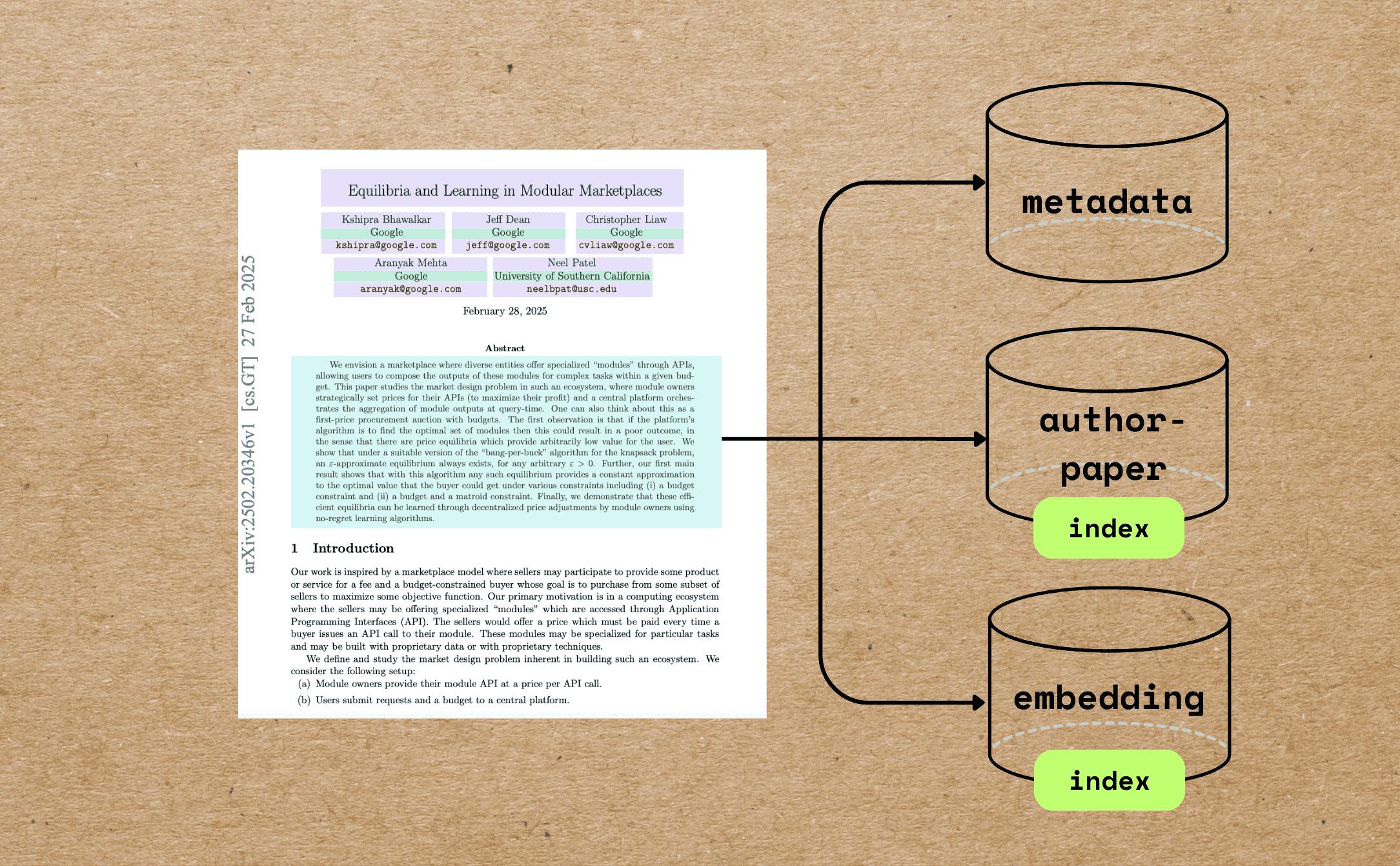
In this blog we will walk through a comprehensive example of indexing research papers with extracting different metadata — beyond full text chunking and embedding — and build semantic embeddings for indexing and querying. ຂໍຂອບໃຈຫຼາຍວ່າທ່ານສາມາດ ຖ້າຫາກວ່າທ່ານກໍາລັງຊອກຫາ tutorial ນີ້ທີ່ດີ. ⭐ star CocoIndex ກ່ຽວກັບ GitHub CocoIndex ກ່ຽວກັບ GitHub ການນໍາໃຊ້ Case ວິທະຍາໄລການຊອກຫາແລະການຊອກຫາ, ເຊັ່ນດຽວກັນກັບການຄົ້ນຄວ້າທີ່ອຸປະກອນ AI ລະບົບການນໍາໃຊ້ Paper Recommendation ການຄົ້ນຄວ້າ Knowledge Graphs ການທົດສອບ semantic ຂອງຄອມພິວເຕີວິທະຍາສາດ ສິ່ງທີ່ພວກເຮົາມີ ຂໍຂອບໃຈວ່າພວກເຮົາຈະເບິ່ງການນີ້ ວິທີການ. ລະຫັດ QR ນີ້ແມ່ນສິ່ງທີ່ພວກເຮົາມີຄວາມຕ້ອງການທີ່ຈະເຮັດວຽກ: Extract the paper metadata, including file name, title, author information, abstract, and number of pages. Build vector embeddings for the metadata, such as the title and abstract, for semantic search. ການຄົ້ນຄວ້າ semantic ໂດຍ metadata ທີ່ດີທີ່ສຸດແມ່ນສາມາດເຮັດໄດ້. ນອກເຫນືອຈາກນີ້, ທ່ານສາມາດຕອບສະຫນອງການຊອກຫາເອກະສານກັບຫົວຂໍ້ແລະ abstracts. Build an index of authors and all the file names associated with each author to answer questions like "Give me all the papers by Jeff Dean." If you want to perform full PDF embedding for the paper, you can also refer to . this article ທ່ານສາມາດຊອກຫາລະຫັດທັງຫມົດ . ຫນ້າທໍາອິດ If this article is helpful to you, please give us a star ການຊ່ວຍເຫຼືອຂອງພວກເຮົາເພີ່ມຂຶ້ນ ດາວໂຫລດ GitHub ອຸປະກອນ Core PDF Preprocessing Reads PDFs using and extracts: pypdf Total number of pages First page content (used as a proxy for metadata-rich information) Markdown Conversion Converts the first page to Markdown using . Marker LLM-Powered Metadata Extraction Sends the first-page Markdown to GPT-4o using CocoIndex's function. ExtractByLlm Extracted metadata includes and more. (string) title (with name, email, and affiliation) authors (string) abstract Semantic Embedding The title is embedded directly using the model by the SentenceTransformer. all-MiniLM-L6-v2 Abstracts are chunked based on semantic punctuation and token count, then each chunk is embedded individually. Relational Data Collection Authors are unrolled and collected into an relation, enabling queries like: author_papers Show all papers by X Which co-authors worked with Y? ຄໍາຖາມ . Install PostgreSQL CocoIndex uses PostgreSQL internally for incremental processing. . Configure your OpenAI API key Alternately, we have native support for Gemini, Ollama, LiteLLM, checkout the . ຄູ່ມື ທ່ານສາມາດເລືອກຜູ້ສະຫນອງ LLM ທີ່ດີທີ່ສຸດຂອງທ່ານແລະສາມາດເຮັດວຽກຢ່າງເຕັມສ່ວນ on-premises. ການນໍາໃຊ້ Indexing Flow ໂຄງການນີ້ສະແດງໃຫ້ເຫັນຕົວຢ່າງທີ່ກວ້າງຂວາງຫຼາຍຂອງການເຂົ້າໃຈ metadata ທີ່ດີກວ່າກັບກໍລະນີການນໍາໃຊ້ໃນໂລກທີ່ແທ້ຈິງ. ທ່ານຈະເບິ່ງໄດ້ຢ່າງງ່າຍດາຍທີ່ຈະໄດ້ຮັບການອອກແບບນີ້ໂດຍ CocoIndex ໃນໄລຍະ 100 ຊຸດຂອງການເຂົ້າລະຫັດ Logic - . ລະຫັດ ສໍາລັບການຊ່ວຍໃຫ້ທ່ານ navigate ທີ່ດີທີ່ສຸດສິ່ງທີ່ພວກເຮົາມີການເດີນທາງ, ນີ້ແມ່ນແຜ່ນ flux. ຊື່ຫຍໍ້ຂອງ : Import a list of papers in PDF For each file: Extract the first page of the paper. Convert the first page to Markdown. Extract metadata (title, authors, abstract) from the first page. Split the abstract into chunks, and compute embeddings for each chunk. Export to the following tables in Postgres with PGVector: Metadata (title, authors, abstract) for each paper. Author-to-paper mapping, for author-based query. Embeddings for titles and abstract chunks, for semantic search. ພວກເຮົາມີການ zoom ໃນເລີ່ມຕົ້ນ. ຜະລິດຕະພັນ @cocoindex.flow_def(name="PaperMetadata") def paper_metadata_flow( flow_builder: cocoindex.FlowBuilder, data_scope: cocoindex.DataScope ) -> None: data_scope["documents"] = flow_builder.add_source( cocoindex.sources.LocalFile(path="papers", binary=True), refresh_interval=datetime.timedelta(seconds=10), ) ດາວນ໌ໂຫລດ The Best Of The Best Of The Best Of The Best ຂໍຂອບໃຈ ລະຫັດ QR flow_builder.add_source filename content ພວກເຮົາສາມາດຕິດຕໍ່ກັບ ສໍາລັບຂໍ້ມູນເພີ່ມເຕີມ ຂໍ້ມູນ ດາວໂຫລດ Metadata ດາວນ໌ໂຫລດ First Page For Basic Info Defines a custom function to extract the first page and number of pages of the PDF. @dataclasses.dataclass class PaperBasicInfo: num_pages: int first_page: bytes @cocoindex.op.function() def extract_basic_info(content: bytes) -> PaperBasicInfo: """Extract the first pages of a PDF.""" reader = PdfReader(io.BytesIO(content)) output = io.BytesIO() writer = PdfWriter() writer.add_page(reader.pages[0]) writer.write(output) return PaperBasicInfo(num_pages=len(reader.pages), first_page=output.getvalue()) ຫຼັງຈາກນັ້ນ, ກະລຸນາຕິດຕໍ່ນີ້ໃນ flux ຂອງທ່ານ. ພວກເຮົາຊອກຫາ metadata ຈາກເວັບໄຊທ໌ຕົ້ນຕໍເພື່ອຮັບປະກັນຄ່າໃຊ້ຈ່າຍການປິ່ນປົວ, ໃນຂະນະທີ່ PDF ທັງຫມົດສາມາດມີຂະຫນາດໃຫຍ່. with data_scope["documents"].row() as doc: doc["basic_info"] = doc["content"].transform(extract_basic_info) ຫຼັງຈາກການເຮັດວຽກນີ້, ທ່ານຄວນມີຂໍ້ມູນພື້ນຖານຂອງແຕ່ລະເອກະສານ. ຫນ້າທໍາອິດ / Basic Info ພວກເຮົາຈະປັບປຸງ ຫນ້າທໍາອິດກັບ Markdown ໂດຍໃຊ້ Marker. Alternatively, you can easily plug in your favorite PDF parser, ເຊັ່ນ Docling. ການຄຸ້ມຄອງຄຸນນະສົມບັດຂອງການປ່ຽນແປງ marker ແລະ cache ມັນ, ໃນຂະນະທີ່ການເລີ່ມຕົ້ນຂອງຕົນແມ່ນຄຸນນະສົມບັດ. ນີ້ຮັບປະກັນວ່າຕົວແທນ Converter ທີ່ດຽວກັນແມ່ນຖືກນໍາໃຊ້ຢ່າງຕໍ່ເນື່ອງສໍາລັບເອກະສານ input ທີ່ແຕກຕ່າງກັນ. @cache def get_marker_converter() -> PdfConverter: config_parser = ConfigParser({}) return PdfConverter( create_model_dict(), config=config_parser.generate_config_dict() ) ການເຊື່ອມຕໍ່ມັນໃນ function custom. @cocoindex.op.function(gpu=True, cache=True, behavior_version=1) def pdf_to_markdown(content: bytes) -> str: """Convert to Markdown.""" with tempfile.NamedTemporaryFile(delete=True, suffix=".pdf") as temp_file: temp_file.write(content) temp_file.flush() text, _, _ = text_from_rendered(get_marker_converter()(temp_file.name)) return text ດາວນ໌ໂຫລດ Transformer with data_scope["documents"].row() as doc: doc["first_page_md"] = doc["basic_info"]["first_page"].transform( pdf_to_markdown ) ຫຼັງຈາກການເຮັດວຽກນີ້, ທ່ານຄວນຈະມີ ຫນ້າທໍາອິດຂອງແຕ່ລະເອກະສານໃນຮູບແບບ Markdown. ດາວນ໌ໂຫລດ LLM CocoIndex ສະ ຫນັບ ສະ ຫນັບ ສະ ຫນັບ ສະ ຫນູນ ສະ ຫນູນ ສະ ຫນູນ ສະ ຫນູນ ສະ ຫນູນ ສະ ຫນູນ ສະ ຫນູນ ສະ ຫນູນ ສະ ຫນູນ ສະ ຫນູນ ສະ ຫນູນ ສະ ຫນູນ ສະ ຫນູນ ສະ ຫນູນ ສະ ຫນູນ ສະ ຫນູນ ສະ ຫນູນ ສະ ຫນູນ ສະ ຫນູນ ສະ ຫນູນ ສະ ຫນູນ ສະ ຫນູນ ສະ ຫນູນ ສະ ຫນູນ ສະ ຫນູນ ສະ ຫນູນ ສະ ຫນູນ ສະ ຫນູນ ສະ ຫນູນ ສະ ຫນູນ ສະ ຫນູນ ຖ້າຫາກວ່າທ່ານກໍາລັງຊອກຫາຂໍ້ມູນເພີ່ມເຕີມກ່ຽວກັບ schemes nested, refer to . ພາສາລາວ @dataclasses.dataclass class PaperMetadata: """ Metadata for a paper. """ title: str authors: list[Author] abstract: str ດາວໂຫລດ The ການເຮັດວຽກ. ມີ dataclass defined, CocoIndex ຈະທົດສອບລັກສະນະ LLM ໃນ dataclass. ExtractByLlm doc["metadata"] = doc["first_page_md"].transform( cocoindex.functions.ExtractByLlm( llm_spec=cocoindex.LlmSpec( api_type=cocoindex.LlmApiType.OPENAI, model="gpt-4o" ), output_type=PaperMetadata, instruction="Please extract the metadata from the first page of the paper.", ) ) ຫຼັງຈາກເລີ່ມຕົ້ນນີ້, ທ່ານຄວນມີ metadata ຂອງແຕ່ລະເອກະສານ. ການເກັບຮັກສາ metadata paper_metadata = data_scope.add_collector() with data_scope["documents"].row() as doc: # ... process # Collect metadata paper_metadata.collect( filename=doc["filename"], title=doc["metadata"]["title"], authors=doc["metadata"]["authors"], abstract=doc["metadata"]["abstract"], num_pages=doc["basic_info"]["num_pages"], ) ຂໍຂອບໃຈວ່າທ່ານກໍາລັງຊອກຫາສິ່ງທຸກຢ່າງທີ່ທ່ານຕ້ອງການ :) ລະຫັດ QR ປະເພດ ຂໍ້ມູນ ຊື່ ພາສາລາວ ຊື່ ພາສາລາວ ພວກເຮົາມີຄວາມຮູ້ສຶກກ່ຽວກັບການຄົ້ນຄວ້າແລະການຄົ້ນຄວ້າຂອງຜູ້ຊ່ຽວຊານ. ຊື່ຫຍໍ້ຂອງ : Simply Collect by Author author_papers = data_scope.add_collector() with data_scope["documents"].row() as doc: with doc["metadata"]["authors"].row() as author: author_papers.collect( author_name=author["name"], filename=doc["filename"], ) ການຄອມພິວເຕີແລະການເກັບຮັກສາ embeddings ລະຫັດ QR doc["title_embedding"] = doc["metadata"]["title"].transform( cocoindex.functions.SentenceTransformerEmbed( model="sentence-transformers/all-MiniLM-L6-v2" ) ) ອັດຕະໂນມັດ ການກັ່ນຕອງ abstract ໃນຊຸດ, ການກັ່ນຕອງແຕ່ລະຊຸດແລະກັ່ນຕອງການກັ່ນຕອງຂອງພວກເຂົາ. ໃນເວລາທີ່ abstract ສາມາດເປັນທີ່ຍິ່ງໃຫຍ່. doc["abstract_chunks"] = doc["metadata"]["abstract"].transform( cocoindex.functions.SplitRecursively( custom_languages=[ cocoindex.functions.CustomLanguageSpec( language_name="abstract", separators_regex=[r"[.?!]+\s+", r"[:;]\s+", r",\s+", r"\s+"], ) ] ), language="abstract", chunk_size=500, min_chunk_size=200, chunk_overlap=150, ) ຫຼັງຈາກເລີ່ມຕົ້ນນີ້, ທ່ານຄວນມີບັນຫາ abstract ຂອງແຕ່ລະເອກະສານ. ຫຼັງຈາກນັ້ນ, ທ່ານຈະຊອກຫາຂໍ້ມູນເພີ່ມເຕີມກ່ຽວກັບການຊອກຫາຂໍ້ມູນຂອງພວກເຮົາ. with doc["abstract_chunks"].row() as chunk: chunk["embedding"] = chunk["text"].transform( cocoindex.functions.SentenceTransformerEmbed( model="sentence-transformers/all-MiniLM-L6-v2" ) ) ຫຼັງຈາກເລີ່ມຕົ້ນນີ້, ທ່ານຄວນຈະມີການເຊື່ອມໂລຫະຂອງຫນຸ່ມ abstract ຂອງລັກສະນະໃດໆ. ລະຫັດ QR metadata_embeddings = data_scope.add_collector() with data_scope["documents"].row() as doc: # ... process # collect title embedding metadata_embeddings.collect( id=cocoindex.GeneratedField.UUID, filename=doc["filename"], location="title", text=doc["metadata"]["title"], embedding=doc["title_embedding"], ) with doc["abstract_chunks"].row() as chunk: # ... process # collect abstract chunks embeddings metadata_embeddings.collect( id=cocoindex.GeneratedField.UUID, filename=doc["filename"], location="abstract", text=chunk["text"], embedding=chunk["embedding"], ) ຜະລິດຕະພັນ ຫຼັງຈາກນັ້ນ, ພວກເຮົາສົ່ງຂໍ້ມູນເພື່ອ Postgres. paper_metadata.export( "paper_metadata", cocoindex.targets.Postgres(), primary_key_fields=["filename"], ) author_papers.export( "author_papers", cocoindex.targets.Postgres(), primary_key_fields=["author_name", "filename"], ) metadata_embeddings.export( "metadata_embeddings", cocoindex.targets.Postgres(), primary_key_fields=["id"], vector_indexes=[ cocoindex.VectorIndexDef( field_name="embedding", metric=cocoindex.VectorSimilarityMetric.COSINE_SIMILARITY, ) ], ) ໃນຕົວຢ່າງນີ້, ພວກເຮົາໃຊ້ PGVector ໃນຖານະເປັນສະຖານີ embedding / ມີ CocoIndex, ທ່ານສາມາດເຮັດການສາຍຫນຶ່ງໃນຕະຖານຂໍ້ມູນ Vector ອື່ນໆທີ່ສະຫນັບສະຫນູນເຊັ່ນ Qdrant, ກະລຸນາເບິ່ງນີ້ ສໍາລັບຂໍ້ມູນເພີ່ມເຕີມ ຄູ່ມື ພວກເຮົາມີຄວາມຕ້ອງການທີ່ຈະມາດຕະຖານ interfaces ແລະເຮັດໃຫ້ມັນເປັນການສ້າງ Lego. ດາວນ໌ໂຫລດ CocoInsight Step by Step ທ່ານສາມາດເຮັດວຽກໂດຍຜ່ານໂຄງການ step by step ໃນ ດາວໂຫລດ ປະເພດ CocoInsight ຄຸນນະສົມບັດຂອງຄຸນນະສົມບັດຂອງຄຸນນະສົມບັດຂອງຄຸນນະສົມບັດແລະຄຸນນະສົມບັດຂອງຄຸນນະສົມບັດຂອງຄຸນສົມບັດ ຊື່ຫຍໍ້ຂອງ : Query Index ຖ້າຫາກວ່າທ່ານສາມາດນໍາໃຊ້ Section of ປະເພດ ລະຫັດ QR ວິທີການສ້າງ query ກັບ embeddings. ໃນປັດຈຸບັນ CocoIndex ບໍ່ສະຫນອງອຸປະກອນ interfaces ຄໍາຮ້ອງສະຫມັກເພີ່ມເຕີມ. ພວກເຮົາສາມາດຂຽນ SQL ຫຼືອຸປະກອນການ ຄໍາຮ້ອງສະຫມັກໂດຍການເກັບຮັກສາຈຸດປະສົງ. ວິທະຍາໄລແລະວິທະຍາໄລຂອງວິທະຍາໄລແລະວິທະຍາໄລຂອງວິທະຍາໄລແລະວິທະຍາໄລຂອງວິທະຍາໄລແລະວິທະຍາໄລຂອງວິທະຍາໄລແລະວິທະຍາໄລຂອງວິທະຍາໄລແລະວິທະຍາໄລຂອງວິທະຍາໄລແລະວິທະຍາໄລ ສະຖານທີ່ການຊອກຫາມີແກ້ໄຂທີ່ດີທີ່ສຸດສໍາລັບການຊອກຫາ, rearanking, ແລະ functionality ອື່ນໆທີ່ກ່ຽວຂ້ອງກັບການຊອກຫາ. ຖ້າຫາກວ່າທ່ານຕ້ອງການການຊ່ວຍເຫຼືອໃນການຂຽນຄໍາຖາມ, ກະລຸນາຮູ້ສຶກບໍ່ເສຍຄ່າເພື່ອຕິດຕໍ່ກັບພວກເຮົາໃນ . ລະຫັດ QR ສະຫນັບສະຫນູນພວກເຮົາ ພວກເຮົາມີການປັບປຸງຢ່າງຕໍ່ເນື່ອງ, ແລະຄຸນນະສົມບັດແລະຕົວຢ່າງເພີ່ມເຕີມຈະໄປຢ້ຽມຢາມໃນປັດຈຸບັນ. If this article is helpful to you, please give us a star ການຊ່ວຍເຫຼືອຂອງພວກເຮົາເພີ່ມຂຶ້ນ ດາວໂຫລດ GitHub ຂໍຂອບໃຈສໍາລັບການອ່ານ!