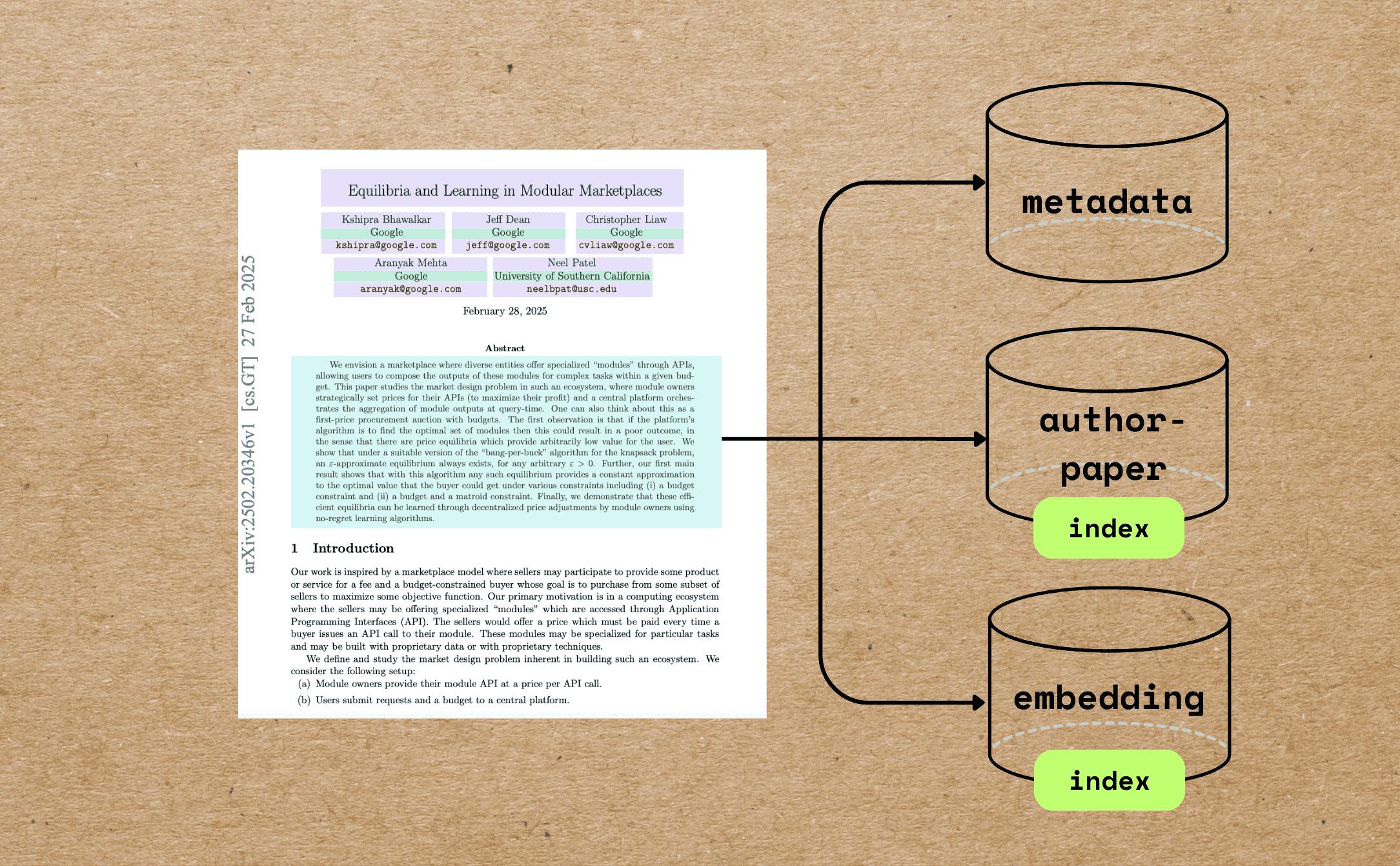
In this blog we will walk through a comprehensive example of indexing research papers with extracting different metadata — beyond full text chunking and embedding — and build semantic embeddings for indexing and querying. 우리는 당신이 할 수 있다면 매우 감사 할 것입니다. 이 튜토리얼이 도움이 되셨다면 ⭐ star GitHub에 있는 CocoIndex GitHub에 있는 CocoIndex 케이스 사용 학문적 검색 및 검색, 연구 기반 AI 에이전트 종이 권장 시스템 연구 지식 그래프 Research Knowledge Graphs 과학 문학의 세맨틱 분석 Semantic analysis of scientific literature 우리가 달성할 것 이것을 살펴보자 예를 들면 PDF 이것은 우리가 성취하고자하는 것입니다 : Extract the paper metadata, including file name, title, author information, abstract, and number of pages. Build vector embeddings for the metadata, such as the title and abstract, for semantic search. 이것은 더 나은 메타데이터를 기반으로 한 의미적 검색 결과를 가능하게 합니다.For example, you can match text queries against titles and abstracts. Build an index of authors and all the file names associated with each author to answer questions like "Give me all the papers by Jeff Dean." If you want to perform full PDF embedding for the paper, you can also refer to . this article 전체 코드를 찾을 수 있습니다. . 여기에 이 글이 도움이 되셨다면, 저희에게 별을 주시기 바랍니다. 우리를 성장시키는 데 도움을 준다. Github 핵심 부품 PDF Preprocessing Reads PDFs using and extracts: pypdf Total number of pages First page content (used as a proxy for metadata-rich information) Markdown Conversion Converts the first page to Markdown using . Marker LLM-Powered Metadata Extraction Sends the first-page Markdown to GPT-4o using CocoIndex's function. ExtractByLlm Extracted metadata includes and more. (string) title (with name, email, and affiliation) authors (string) abstract Semantic Embedding The title is embedded directly using the model by the SentenceTransformer. all-MiniLM-L6-v2 Abstracts are chunked based on semantic punctuation and token count, then each chunk is embedded individually. Relational Data Collection Authors are unrolled and collected into an relation, enabling queries like: author_papers Show all papers by X Which co-authors worked with Y? 전제조건 . Install PostgreSQL CocoIndex uses PostgreSQL internally for incremental processing. . Configure your OpenAI API key Alternatively, we have native support for Gemini, Ollama, LiteLLM, checkout the . 가이드 당신은 당신의 마음에 드는 LLM 제공자를 선택할 수 있고 완전히 현장에서 일할 수 있습니다. Indexing Flow를 정의하기 이 프로젝트는 실제 사용 사례에 더 가깝게 메타데이터 이해의 약간 더 포괄적 인 예를 보여줍니다. 이 디자인을 CocoIndex에 의해 100 줄의 인덱싱 논리 내에서 달성하는 것이 얼마나 쉬운지 알 수 있습니다. . 코드 우리가 걷는 것을 더 잘 탐색하려면 여기에 흐름 차트가 있습니다. PDF로 문서 목록을 가져오기. For each file: Extract the first page of the paper. Convert the first page to Markdown. Extract metadata (title, authors, abstract) from the first page. Split the abstract into chunks, and compute embeddings for each chunk. Export to the following tables in Postgres with PGVector: Metadata (title, authors, abstract) for each paper. Author-to-paper mapping, for author-based query. Embeddings for titles and abstract chunks, for semantic search. 다음 단계에서 zoom를 해보자. 문서를 가져오기 @cocoindex.flow_def(name="PaperMetadata") def paper_metadata_flow( flow_builder: cocoindex.FlowBuilder, data_scope: cocoindex.DataScope ) -> None: data_scope["documents"] = flow_builder.add_source( cocoindex.sources.LocalFile(path="papers", binary=True), refresh_interval=datetime.timedelta(seconds=10), ) 밑바닥이 있는 테이블을 만듭니다 ( , 는 , flow_builder.add_source filename content 우리는 언급할 수 있다 The 더 많은 세부사항을 문서화 메타데이터 추출 및 수집 기본 정보에 대한 첫 페이지 추출 PDF의 첫 페이지와 페이지 수를 추출하기 위해 사용자 지정 함수를 정의합니다.Defines a custom function to extract the first page and number of pages of the PDF. @dataclasses.dataclass class PaperBasicInfo: num_pages: int first_page: bytes @cocoindex.op.function() def extract_basic_info(content: bytes) -> PaperBasicInfo: """Extract the first pages of a PDF.""" reader = PdfReader(io.BytesIO(content)) output = io.BytesIO() writer = PdfWriter() writer.add_page(reader.pages[0]) writer.write(output) return PaperBasicInfo(num_pages=len(reader.pages), first_page=output.getvalue()) 이제 이것을 당신의 흐름에 삽입하십시오. 우리는 전체 PDF가 매우 크기 때문에 처리 비용을 최소화하기 위해 첫 페이지에서 메타데이터를 추출합니다. with data_scope["documents"].row() as doc: doc["basic_info"] = doc["content"].transform(extract_basic_info) 이 단계 후에, 당신은 각 종이의 기본 정보를 가지고 있어야합니다. 기본 정보 Parse 우리는 Marker를 사용하여 첫 번째 페이지를 Markdown로 변환합니다. 또는 Docling과 같은 좋아하는 PDF 분석기를 쉽게 연결할 수 있습니다. 마커 변환기 함수를 정의하고 그것의 초기화가 리소스 집중적이기 때문에 캐시하십시오. 이것은 동일한 변환기 인스턴스가 다른 입력 파일에 다시 사용되도록 보장합니다.This ensures that the same converter instance is reused for different input files. @cache def get_marker_converter() -> PdfConverter: config_parser = ConfigParser({}) return PdfConverter( create_model_dict(), config=config_parser.generate_config_dict() ) 그것을 사용자 정의 기능으로 삽입하십시오. @cocoindex.op.function(gpu=True, cache=True, behavior_version=1) def pdf_to_markdown(content: bytes) -> str: """Convert to Markdown.""" with tempfile.NamedTemporaryFile(delete=True, suffix=".pdf") as temp_file: temp_file.write(content) temp_file.flush() text, _, _ = text_from_rendered(get_marker_converter()(temp_file.name)) return text 그것을 당신의 변형에 전달하십시오. with data_scope["documents"].row() as doc: doc["first_page_md"] = doc["basic_info"]["first_page"].transform( pdf_to_markdown ) 이 단계가 끝나면 Markdown 형식으로 각 종이의 첫 페이지가 있어야합니다. LLM에 대한 기본 정보 추출 LLM 추출을위한 계획을 정의합니다. CocoIndex는 복잡하고 둥근 계획으로 LLM 구조 추출을 기본적으로 지원합니다. 당신이 둥지 계획에 대해 더 많이 배우고 싶다면, 참조하십시오. . 이 기사 @dataclasses.dataclass class PaperMetadata: """ Metadata for a paper. """ title: str authors: list[Author] abstract: str 그것을 플러그인에 넣어 데이터 클래스가 정의되면 CocoIndex는 자동으로 LLM 응답을 데이터 클래스에 분석합니다. ExtractByLlm doc["metadata"] = doc["first_page_md"].transform( cocoindex.functions.ExtractByLlm( llm_spec=cocoindex.LlmSpec( api_type=cocoindex.LlmApiType.OPENAI, model="gpt-4o" ), output_type=PaperMetadata, instruction="Please extract the metadata from the first page of the paper.", ) ) 이 단계가 끝나면 각 종이의 메타데이터가 있어야합니다. 종이 메타데이터 수집 paper_metadata = data_scope.add_collector() with data_scope["documents"].row() as doc: # ... process # Collect metadata paper_metadata.collect( filename=doc["filename"], title=doc["metadata"]["title"], authors=doc["metadata"]["authors"], abstract=doc["metadata"]["abstract"], num_pages=doc["basic_info"]["num_pages"], ) 당신이 필요로하는 모든 것을 수집하십시오 :) 컬렉션 두 정보 작가 필리핀 작가 필리핀 여기서 우리는 검색 기능을 구축하기 위해 별도의 테이블에 Author → Papers를 수집하고 싶습니다. 작가에 의해 단순히 수집됩니다. author_papers = data_scope.add_collector() with data_scope["documents"].row() as doc: with doc["metadata"]["authors"].row() as author: author_papers.collect( author_name=author["name"], filename=doc["filename"], ) 계산 및 수집 embeddings 제목 doc["title_embedding"] = doc["metadata"]["title"].transform( cocoindex.functions.SentenceTransformerEmbed( model="sentence-transformers/all-MiniLM-L6-v2" ) ) abstract에 대하여 abstract를 조각으로 나누어 각 조각을 삽입하고 그들의 삽입을 수집하십시오. 때로는 추상화가 매우 길어질 수 있습니다. doc["abstract_chunks"] = doc["metadata"]["abstract"].transform( cocoindex.functions.SplitRecursively( custom_languages=[ cocoindex.functions.CustomLanguageSpec( language_name="abstract", separators_regex=[r"[.?!]+\s+", r"[:;]\s+", r",\s+", r"\s+"], ) ] ), language="abstract", chunk_size=500, min_chunk_size=200, chunk_overlap=150, ) 이 단계 후에는 각 종이의 추상 조각을 가져야합니다. 각 조각을 삽입하고 삽입물을 수집하십시오. with doc["abstract_chunks"].row() as chunk: chunk["embedding"] = chunk["text"].transform( cocoindex.functions.SentenceTransformerEmbed( model="sentence-transformers/all-MiniLM-L6-v2" ) ) 이 단계 후에는 각 종이의 추상 조각의 삽입이 있어야합니다. 컬렉션 Embeddings metadata_embeddings = data_scope.add_collector() with data_scope["documents"].row() as doc: # ... process # collect title embedding metadata_embeddings.collect( id=cocoindex.GeneratedField.UUID, filename=doc["filename"], location="title", text=doc["metadata"]["title"], embedding=doc["title_embedding"], ) with doc["abstract_chunks"].row() as chunk: # ... process # collect abstract chunks embeddings metadata_embeddings.collect( id=cocoindex.GeneratedField.UUID, filename=doc["filename"], location="abstract", text=chunk["text"], embedding=chunk["embedding"], ) 수출 마지막으로, 우리는 데이터를 Postgres로 내보냅니다. paper_metadata.export( "paper_metadata", cocoindex.targets.Postgres(), primary_key_fields=["filename"], ) author_papers.export( "author_papers", cocoindex.targets.Postgres(), primary_key_fields=["author_name", "filename"], ) metadata_embeddings.export( "metadata_embeddings", cocoindex.targets.Postgres(), primary_key_fields=["id"], vector_indexes=[ cocoindex.VectorIndexDef( field_name="embedding", metric=cocoindex.VectorSimilarityMetric.COSINE_SIMILARITY, ) ], ) 이 예제에서는 PGVector를 삽입 상점/ CocoIndex를 사용하면 Qdrant와 같은 다른 지원되는 벡터 데이터베이스에서 하나의 라인 스위치를 수행할 수 있습니다. 더 많은 세부사항을 가이드 우리는 인터페이스를 표준화하고 레고를 만드는 것과 같습니다. CocoInsight에서 단계별로 보기 당신은 프로젝트를 통해 단계별로 걸을 수 있습니다 보기 코코인사이트 각 필드가 어떻게 구축되었는지, 그리고 무대 뒤에서 무슨 일이 일어나고 있는지. 원하는 index 당신은이 섹션을 참조할 수 있습니다 대략 텍스트 Embeddings 삽입에 대한 쿼리를 만드는 방법.How to build query against embeddings. 현재 CocoIndex는 추가 쿼리 인터페이스를 제공하지 않습니다.We can write SQL or rely on the query engine by the target storage. 많은 데이터베이스는 이미 자신의 최적의 관행을 사용하여 쿼리 구현을 최적화했습니다. 쿼리 공간은 쿼리, 리 랭킹 및 기타 검색 관련 기능을 위한 훌륭한 솔루션을 갖추고 있습니다.The query space has excellent solutions for querying, rearanking, and other search-related functionality. 당신이 쿼리를 작성하는 데 도움을 필요로하는 경우에, 저희에게 연락하는 것을 자유롭게 느끼십시오. . 분쟁 우리를 지지 우리는 끊임없이 개선하고 있으며 더 많은 기능과 예가 곧 올 것입니다. 이 글이 도움이 되셨다면, 저희에게 별을 주시기 바랍니다. 우리를 성장시키는 데 도움을 준다. Github Thanks for reading!