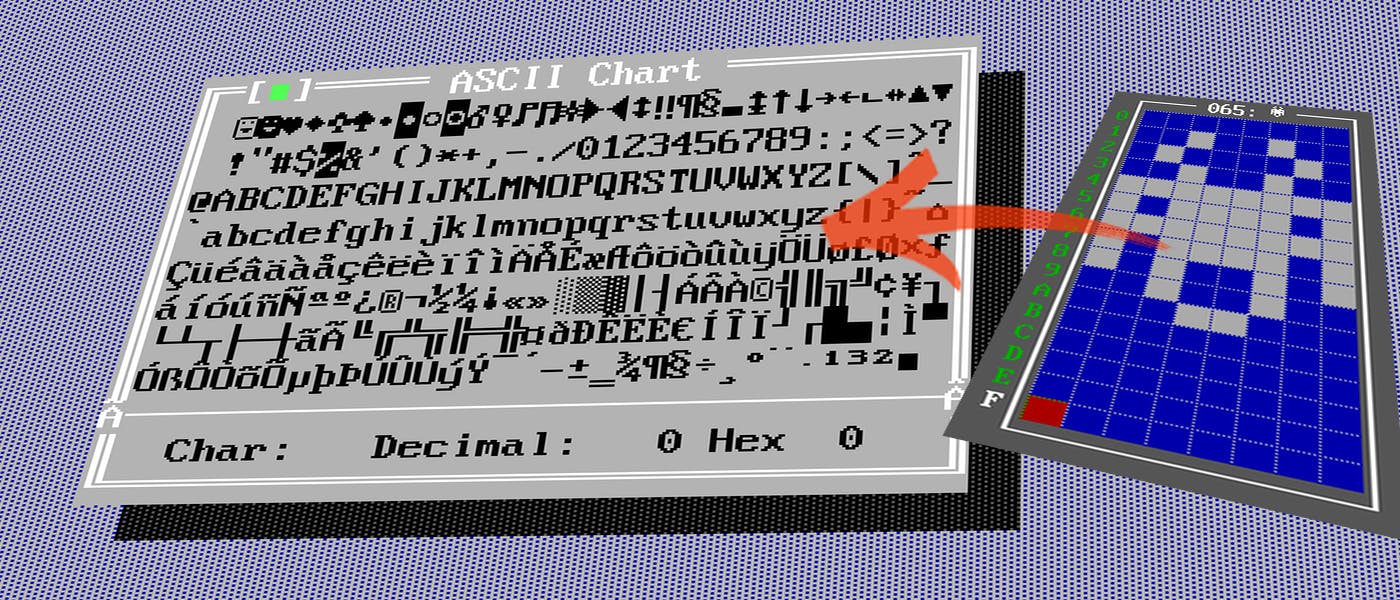
8086 時代の DOS 環境では、テキスト ディスプレイは典型的に BIOS とグラフィック アダプタの組み込み文字生成器に依存し、複雑なフォント レンダリングシステムではなく、フォントは CGA、EGA、または VGA などのアダプタによって実装された特定のテキスト モードに固く結び付けられました。 私たちの以前の深いダイビングの1つで、我々は不思議な and how to integrate hardware timers to produce simple beeps with the 今回は、そのピクセルデータを再定義することにより、ASCII文字(この場合「A」)の外観を変更します。 VGAモード 13h PCスピーカー ASCIIとDOSキャラクターセット ASCII (American Standard Code for Information Interchange) は、元々、文字(文字、数字、点数)を 0 から 127 までの範囲で定義する 7 ビットのコードです。 テキストモード 03h(80×25) 8086 DOS でテキスト出力に使用される典型的な表示モードの 1 つは Mode 03h. In Mode 03h, the screen is divided into 80 columns and 25 rows of text characters. Each position on the screen is one text キャラクター1つと属性(フロントやバックグラウンドの色、フラッキングなど)を持ちます。 cell 最も初期のCGA(Color Graphics Adapter)では、各テキストセルは通常8×8ピクセルのマトリックス(一部のアダプターでは、EGAには8×14または9×14、VGAには9×16を使用する可能性があります)。 80×25 テキストモードの標準 VGA では、それぞれの文字のセルは通常 9 ピクセル幅と 16 ピクセル高である(実際のグリフ自体は 8 ピクセル幅のみを占めるかもしれないが、9 番目の列はスペースまたはその他の機能に使用される)。 80×25の典型的なVGAテキストモードの9×16文字のセルを考慮すると、原色ピクセルの全画面解像度は720×400(80列×9ピクセルの幅、25行×16ピクセルの高さ)です。Mode 03hでは、各文字がビデオRAM(ES:DI B800h:0000h)に保存され、文字インデックスのバイト(00h - FFh)とフロント色と背景色を定義するための別のバイト(F-F for the Background and 0-F for the Foreground)があります。 どうする? 既定のテキストモードの外観を超えたい場合があります。もしかしたら、独自のシンボルを表示したり、ASCIIグラフィックでクリエイティブになったりしたいかもしれません。DOSやその他の低レベルの環境では、BIOSやVGAメモリを直接操作して、各キャラクターのピクセルがどう見えるかを定義する素晴らしい能力があります。私たちはBIOSの中断10hをAL=11hで使用してカスタマイズされたフォントをロードします。 STEP BY STEP まず、再び当社のスタートアップ環境をクローン化し、以下に従うことができます。 git clone git@github.com:MilesTails01/i8086_boilercode.git ダウンロード後、DOSBOX.zip と TOOLS.zip をパッケージ解除する必要があります。 cd \bin tar -xf TOOLS.zip tar -xf DOSBOX.zip build.bat // Compile, Link and Start the source debug.bat // Starts AFDEBUG and loads the compiled exe start.bat // Start the program without rebuilding it 不要なものを削除し、コードをシンプルにし、最小限から始める。 ; ################################# ; # ASCII.ASM # ; ################################# ; ################################# ; # STACK # ; ################################# STACK SEGMENT PARA STACK db 256 dup(0) STACK ENDS ; ################################# ; # DATA # ; ################################# DATA SEGMENT PARA 'DATA' DATA ENDS ; ################################# ; # CODE # ; ################################# CODE SEGMENT PARA 'CODE' ASSUME cs:CODE, ds:DATA, ss:STACK mov ax, DATA mov ds, ax mov ax, STACK mov ss, ax mov sp, 256 CODE ENDS ステップ1 まず、文字ピクセルデータを定義しましょう。 背景の色になるし、 通常の80x25モードで、文字のサイズは9x16になります。我々は8bitの原因を含む各行14行を定義します(9bitの0の原因 dbが1バイトに制限されることを覚えておいてください)。 0 1 CHAR_DATA db 010101010b db 010101010b db 010101010b db 010101010b db 010101010b db 010101010b db 010101010b db 010101010b db 010101010b db 010101010b db 010101010b db 010101010b db 010101010b db 010101010b ステップ2 文字で画面全体を満たす印刷機能を定義しましょう。 A PRINT PROC NEAR mov ax, 0B800h ; VGA text mode memory segment mov es, ax mov di, 0 ; Start at the top-left of the screen mov cx, 2000 ; 80x25 screen = 2000 characters mov al, 'A' ; ASCII code for 'A' mov ah, 19h ; Attribute byte (blue on white) rep stosw ; Fill screen with 'A' ret PRINT ENDP ステップ3 次に重要な部分: AH を 11h に設定し、中断 10h (Bios Interrupt) を使用します. 私はコメントに AX、BX、CX、DX、BP のパラメータの定義を書きました. REPLACE_ASCII PROC NEAR ; mov ax, 03h ; Set video mode to text mode (80x25, color) ; int 10h ; 9x16 font size ; ; mov ax, 1112h ; Force 8x8 font size for character cells ; xor bl, bl ; RAM block ; int 10h ; Change text mode character (int 10h) ; AH = 11h ; BH = Number of bytes per character ; CX = Number of characters to change ; DX = Starting character to change ; ES:BP = Offset of character data push ds pop es ; make sure es = ds lea bp, CHAR_DATA ; Pointer to custom font data mov ax, 1100h ; Load user-defined font mov bh, 0Eh ; Number of bytes per character xor bl,bl ; RAM block mov cx, 01h ; Number of characters to replace = 1 for now mov dx, 41h ; Starting character to change (41h = 'A' in ASCII) int 10h ; Call BIOS to load the font ret REPLACE_ASCII ENDP ステップ4 オプション:あなたが望む場合は、画面の真ん中に現在のASCIIテーブルを印刷することができます;) ASCIIPRINT PROC NEAR mov ax, 0B800h ; VGA text mode memory segment mov es, ax xor di, di ; Reset offset mov cx, 5 ; Total number of characters (0-255) mov ah, 4Fh ; Attribute byte (red on white) mov dl, 10 ; Padding on the left (adjust as needed) mov dh, 60 ; Total width of the centered line (adjust as needed) mov di, 1620 ; Row (10 x 80 + padding) * 2, starting with left padding PrintLoop: stosw ; Store the character (AL) and attribute (AH) inc al ; Move to the next ASCII character dec dh ; Decrement width counter jnz PrintLoop ; Continue until row width is filled add di, 40 ; Move to the next row with padding ((80 - 60) * 2) mov dh, 60 ; Reset row width loop PrintLoop ; Repeat for all 256 characters ret ASCIIPRINT ENDP 結果 Aの各キャラクターは新しいストリップブロックに置き換えられました. This Glyph will come in very handy in a later article. 完全コード ; ################################# ; # ASCII.ASM # ; ################################# ; ################################# ; # STACK # ; ################################# STACK SEGMENT PARA STACK db 256 dup(0) STACK ENDS ; ################################# ; # DATA # ; ################################# DATA SEGMENT PARA 'DATA' CHAR_DATA db 010101010b db 010101010b db 010101010b db 010101010b db 010101010b db 010101010b db 010101010b db 010101010b db 010101010b db 010101010b db 010101010b db 010101010b db 010101010b db 010101010b DATA ENDS ; ################################# ; # CODE # ; ################################# CODE SEGMENT PARA 'CODE' ASSUME cs:CODE, ds:DATA, ss:STACK mov ax, DATA mov ds, ax mov ax, STACK mov ss, ax mov sp, 256 ; ################################# ; # MAIN # ; ################################# call REPLACE_ASCII call PRINT call ASCIIPRINT ret ; ============================= ; | FUNCTIONS | ; ============================= PUBLIC REPLACE_ASCII REPLACE_ASCII PROC NEAR ; mov ax, 03h ; Set video mode to text mode (80x25, color) ; int 10h ; 9x16 font size ; ; mov ax, 1112h ; Force 8x8 font size for character cells ; xor bl, bl ; RAM block ; int 10h ; Change text mode character (int 10h) ; AH = 11h ; BH = Number of bytes per character ; CX = Number of characters to change ; DX = Starting character to change ; ES:BP = Offset of character data push ds pop es ; make sure es = ds lea bp, CHAR_DATA ; Pointer to custom font data mov ax, 1100h ; Load user-defined font mov bh, 0Eh ; Number of bytes per character xor bl,bl ; RAM block mov cx, 01h ; Number of characters to replace = 1 for now mov dx, 41h ; Starting character to change (41h = 'A' in ASCII) int 10h ; Call BIOS to load the font ret REPLACE_ASCII ENDP PRINT PROC NEAR mov ax, 0B800h ; VGA text mode memory segment mov es, ax mov di, 0 ; Start at the top-left of the screen mov cx, 2000 ; 80x25 screen = 2000 characters mov al, 'A' ; ASCII code for 'A' mov ah, 19h ; Attribute byte (blue on white) rep stosw ; Fill screen with 'A' ret PRINT ENDP ASCIIPRINT PROC NEAR mov ax, 0B800h ; VGA text mode memory segment mov es, ax xor di, di ; Reset offset mov cx, 5 ; Total number of characters (0-255) mov ah, 4Fh ; Attribute byte (red on white) mov dl, 10 ; Padding on the left (adjust as needed) mov dh, 60 ; Total width of the centered line (adjust as needed) mov di, 1620 ; Row (10 x 80 + padding) * 2, starting with left padding PrintLoop: stosw ; Store the character (AL) and attribute (AH) inc al ; Move to the next ASCII character dec dh ; Decrement width counter jnz PrintLoop ; Continue until row width is filled add di, 40 ; Move to the next row with padding ((80 - 60) * 2) mov dh, 60 ; Reset row width loop PrintLoop ; Repeat for all 256 characters ret ASCIIPRINT ENDP CODE ENDS END