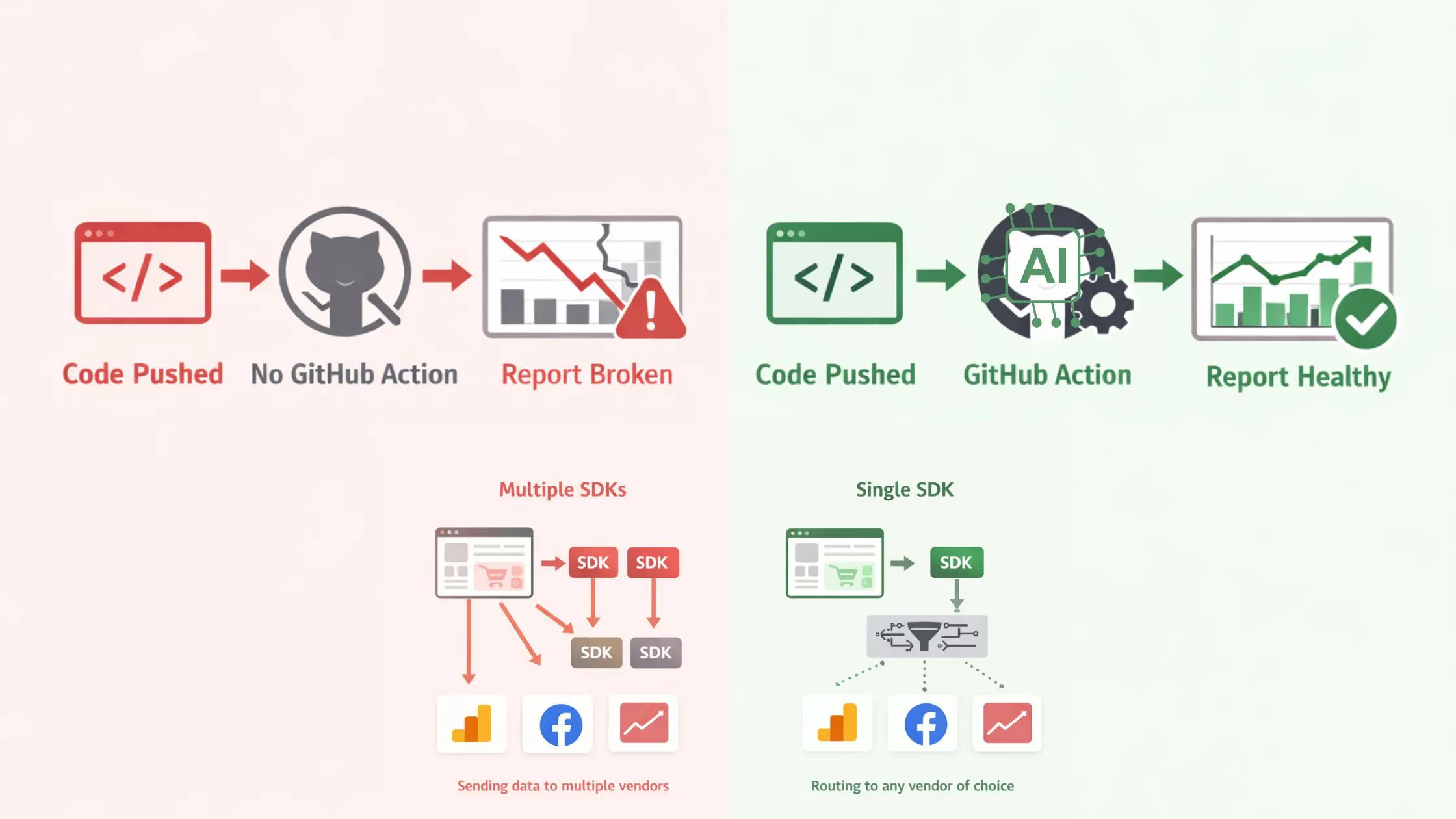
The Problem - Analytics breaks silently. Website analytics issues do not surface as incidents the way other bugs do. They slip through the crack silently. You get to know about them only when you are looking at the revenue analytics dashboard, and the metrics do not match your accounting books, your gut finally says, probably I should check the analytics instrumentation code for issues. Had this check existed on every PR that changed the analytics instrumentation code, none of this would have reached the dashboard. And you wouldn’t have made bad business decisions on faulty analytics data. Let's get it done in the next 15 mins! First, make your analytics free from vendor lock-in using the RudderStack SDK Currently, you might have one or more analytics SDKs (Google Analytics, Amplitude, Google Ads, etc.) on your website. This slows down your website. And because they are tightly integrated with your app as code, if you want to switch to another vendor, you'll have to import their SDK and make the changes in the code. A long, error-prone process. In the next 5 mins, you'll get rid of all of them without breaking the analytics. To do that, you need one SDK to rule them all. Provided by event streaming tools such as Segment or its self-hosted alternative, RudderStack. After setting it up, you will be able to collect events from your websites (source) and send them to any analytics/marketing service of your choice (destination). With that in place, if you ever need to switch to a different analytics service, it will be a quick dashboard settings change, not a code change in your website. Here’s how to replace all your analytics and marketing tool SDKs with one RudderStack SDK Step 1: Create your dashboard to control your data sources/destinations settings. This dashboard controls only these settings. The actual customer event data will not flow through this service. You will either self-host the event streaming server to process customer event data, i.e., the data plane, or use a cloud-hosted data plane to quickly get started. Source code - https://github.com/rudderlabs/rudder-server Step 1: Create your dashboard not https://github.com/rudderlabs/rudder-server Step 2: Replace all your existing analytics SDKs with one RudderStack SDK. tl;dr: add these 5 lines of code to your website Step 2: RudderStack SDK // Step 1: Install the SDK - `npm i @rudderstack/analytics-js` // Step 2: Initalize the SDK import { RudderAnalytics } from '@rudderstack/analytics-js'; const rudderAnalytics = new RudderAnalytics(); rudderAnalytics.load(process.env.WRITE_KEY, process.env.DATA_PLANE_URL, {}); // Q: How to generate your WRITE_KEY and DATA_PLANE_URL? // A: Create a new JavaScript source at https://app.rudderstack.com export { rudderAnalytics }; // Step 3: Call event tracking methods such as `page`, `track`, `identify`, etc. as needed rudderAnalytics.page(); // NOTICE: This code works only if you have set up your browser-side code to use `npm` modules. Follow the quickstart guide otherwise - https://www.rudderstack.com/docs/sources/event-streams/sdks/rudderstack-javascript-sdk/quickstart/ // Step 1: Install the SDK - `npm i @rudderstack/analytics-js` // Step 2: Initalize the SDK import { RudderAnalytics } from '@rudderstack/analytics-js'; const rudderAnalytics = new RudderAnalytics(); rudderAnalytics.load(process.env.WRITE_KEY, process.env.DATA_PLANE_URL, {}); // Q: How to generate your WRITE_KEY and DATA_PLANE_URL? // A: Create a new JavaScript source at https://app.rudderstack.com export { rudderAnalytics }; // Step 3: Call event tracking methods such as `page`, `track`, `identify`, etc. as needed rudderAnalytics.page(); // NOTICE: This code works only if you have set up your browser-side code to use `npm` modules. Follow the quickstart guide otherwise - https://www.rudderstack.com/docs/sources/event-streams/sdks/rudderstack-javascript-sdk/quickstart/ You made the change in your website code. Raised a PR, not merged yet. When you visit your test server, link to your website. In your RudderStack source live events dashboard, you should now see the events flowing. But events are not flowing to your previous destinations yet. So, let’s fix that. Step 3: Add your original analytics/marketing services as destinations in your RudderStack dashboard to restore your old analytics services. These services are supported as the destinations out of the box; others can be supported either via webhook or by building your own custom integration - https://github.com/rudderlabs/rudder-transformer/blob/develop/CONTRIBUTING.md#building-your-first-custom-rudderstack-source-integration Step 3: These services webhook https://github.com/rudderlabs/rudder-transformer/blob/develop/CONTRIBUTING.md#building-your-first-custom-rudderstack-source-integration Now, when you visit your test server again, you should be able to see these events in your analytics services as they were flowing earlier. The destination live events will show you everything you need at this point. With the analytics instrumentation done, half the battle is won. destination live events You are in control now, free from the analytics vendor lock-in You are in control now, free from the analytics vendor lock-in You can merge at this step, but wait! Before you merge the PR, let’s do something that will ensure that you do not accidentally break your analytics in the future. We will add a GitHub Action to review your PRs for analytics instrumentation and data quality issues. Second, make your analytics fail-proof using an AI-powered GitHub workflow. Let’s use this GitHub action - https://github.com/rudderlabs/rudder-ai-reviewer https://github.com/rudderlabs/rudder-ai-reviewer With this, you will never break your analytics instrumentation, and your data quality issues will never end up in production. Create .github/workflows/rudder-ai-reviewer.yml in your repo: .github/workflows/rudder-ai-reviewer.yml name: Rudder AI Reviewer on: pull_request: types: [opened, synchronize] permissions: contents: read # Required to checkout the repository pull-requests: write # Required to post review comments jobs: review: runs-on: ubuntu-latest steps: - uses: actions/checkout@93cb6efe18208431cddfb8368fd83d5badbf9bfd # v5.0.1 - name: Rudder AI Reviewer uses: rudderlabs/rudder-ai-reviewer@v1 with: source-id: ${{ secrets.RUDDERSTACK_SOURCE_ID }} service-access-token: ${{ secrets.RUDDERSTACK_SERVICE_ACCESS_TOKEN }} name: Rudder AI Reviewer on: pull_request: types: [opened, synchronize] permissions: contents: read # Required to checkout the repository pull-requests: write # Required to post review comments jobs: review: runs-on: ubuntu-latest steps: - uses: actions/checkout@93cb6efe18208431cddfb8368fd83d5badbf9bfd # v5.0.1 - name: Rudder AI Reviewer uses: rudderlabs/rudder-ai-reviewer@v1 with: source-id: ${{ secrets.RUDDERSTACK_SOURCE_ID }} service-access-token: ${{ secrets.RUDDERSTACK_SERVICE_ACCESS_TOKEN }} Commit, push, and open a PR that touches any instrumentation code. The reviewer runs automatically. The action will detect the RudderStack SDK and the instrumentation changes automatically, review using AI, and suggest fixes as inline review comments. Conclusion First, you gained control of your website analytics by replacing all your analytics SDKs with one unified event streaming SDK - RudderStack SDK. Then you added a GitHub action that reviews each PR for analytics implementation issues. Now, you can go ahead and merge the PR if Rudder AI Reviewer does not give you any warning. In the future, you'll automatically receive reviews on PRs that impact the analytics instrumentation, data quality, and privacy compliance. You can further improve this workflow by creating a tracking plan in your RudderStack dashboard. Go ahead and explore the tools I mentioned here for more details https://github.com/rudderlabs/rudder-server | Docs https://github.com/rudderlabs/rudder-ai-reviewer | Docs https://github.com/rudderlabs/rudder-server | Docs https://github.com/rudderlabs/rudder-server Docs https://github.com/rudderlabs/rudder-ai-reviewer | Docs https://github.com/rudderlabs/rudder-ai-reviewer Docs