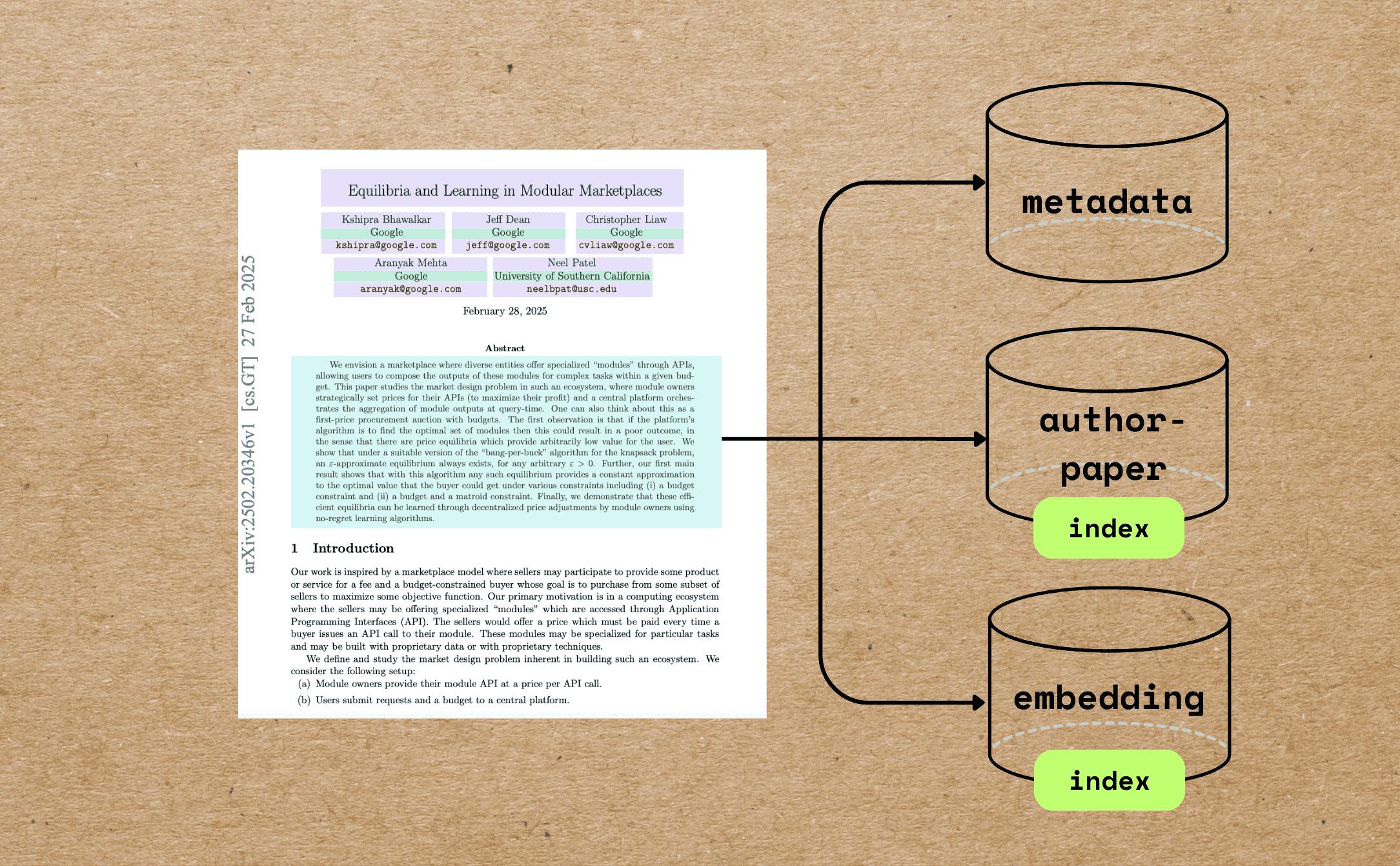
In this blog we will walk through a comprehensive example of indexing research papers with extracting different metadata — beyond full text chunking and embedding — and build semantic embeddings for indexing and querying. We would greatly appreciate it if you could இந்த tutorial உங்களுக்கு உதவியாக இருக்கும். ⭐ star CocoIndex on GitHub GitHub இல் CocoIndex Case பயன்பாடு Academic search and retrieval, as well as research-based AI agents - அறிவியல் ஆய்வு Paper Recommendation அமைப்பு அறிவியல் Graphs Semantic Analysis of Scientific Literature அறிவியல் ஆய்வு நாம் எதைப் பெறுவோம் இதனை பாருங்கள் ஒரு உதாரணம் PDF இல் இதோ நாம் செய்ய வேண்டியவை: Extract the paper metadata, including file name, title, author information, abstract, and number of pages. Build vector embeddings for the metadata, such as the title and abstract, for semantic search. இந்த மாதிரி think different type விளம்பரங்கள் தான் add industriesla இப்போ Hot... Build an index of authors and all the file names associated with each author to answer questions like "Give me all the papers by Jeff Dean." If you want to perform full PDF embedding for the paper, you can also refer to . this article முழு குறியீடு கண்டுபிடிக்க முடியும் . இங்கே இந்த கட்டுரை உங்களுக்கு உதவியாக இருந்தால், தயவுசெய்து எங்களுக்கு ஒரு ஸ்டார் கொடுக்கவும் ⭐ at நம்மை வளர்க்க உதவுகிறது. GitHub இல் Core பொருட்கள் PDF Preprocessing Reads PDFs using and extracts: pypdf Total number of pages First page content (used as a proxy for metadata-rich information) Markdown Conversion Converts the first page to Markdown using . Marker LLM-Powered Metadata Extraction Sends the first-page Markdown to GPT-4o using CocoIndex's function. ExtractByLlm Extracted metadata includes and more. (string) title (with name, email, and affiliation) authors (string) abstract Semantic Embedding The title is embedded directly using the model by the SentenceTransformer. all-MiniLM-L6-v2 Abstracts are chunked based on semantic punctuation and token count, then each chunk is embedded individually. Relational Data Collection Authors are unrolled and collected into an relation, enabling queries like: author_papers Show all papers by X Which co-authors worked with Y? முன்மொழிந்து . Install PostgreSQL CocoIndex uses PostgreSQL internally for incremental processing. . Configure your OpenAI API key Alternatively, we have native support for Gemini, Ollama, LiteLLM, check out the . நேர்மை நீங்கள் உங்கள் விருப்பமான LLM வழங்குநர் தேர்வு மற்றும் முழுமையாக இடையில் வேலை செய்ய முடியும். index flow குறியீடு This project demonstrates a slightly more comprehensive example of metadata understanding closer to real-world use cases. நீங்கள் எவ்வளவு எளிதாக CocoIndex மூலம் இந்த வடிவமைப்பை 100 வரிகளில் அணுகுவது என்று பார்க்கலாம் - . குறியீடு சிறந்த உதவியுடன் நீங்கள் எதை நாம் நடந்து செல்ல உதவும், இங்கே ஒரு வடிவமைப்பு உள்ளது. ஒரு பதிவுகளை PDF இல் பதிவிறக்கவும். For each file: Extract the first page of the paper. Convert the first page to Markdown. Extract metadata (title, authors, abstract) from the first page. Split the abstract into chunks, and compute embeddings for each chunk. Export to the following tables in Postgres with PGVector: Metadata (title, authors, abstract) for each paper. Author-to-paper mapping, for author-based query. Embeddings for titles and abstract chunks, for semantic search. சென்னையில் சென்னையிலே போகலாம் பதிவுகள் import @cocoindex.flow_def(name="PaperMetadata") def paper_metadata_flow( flow_builder: cocoindex.FlowBuilder, data_scope: cocoindex.DataScope ) -> None: data_scope["documents"] = flow_builder.add_source( cocoindex.sources.LocalFile(path="papers", binary=True), refresh_interval=datetime.timedelta(seconds=10), ) அலுவலகத்திலுள்ள ஒரு அலுவலகம் உருவாக்கப்படும் ( , , flow_builder.add_source filename content நாம் சொல்ல முடியும் the மேலும் Details பதிவுகள் சேகரிப்பு மற்றும் metadata collection First page for basic info முதல் பக்கம் முதல் பக்கம் மற்றும் PDF பக்கங்கள் எண்ணிக்கை வெளியிடுவதற்கு ஒரு தனிப்பட்ட செயல்பாடு அமைக்கவும். @dataclasses.dataclass class PaperBasicInfo: num_pages: int first_page: bytes @cocoindex.op.function() def extract_basic_info(content: bytes) -> PaperBasicInfo: """Extract the first pages of a PDF.""" reader = PdfReader(io.BytesIO(content)) output = io.BytesIO() writer = PdfWriter() writer.add_page(reader.pages[0]) writer.write(output) return PaperBasicInfo(num_pages=len(reader.pages), first_page=output.getvalue()) இப்போது இதை உங்கள் வாயிலில் சேர்த்து கொள்ளுங்கள். நாங்கள் முதன்முதலில் இருந்து MetaData வெளியிடுகிறோம், ஏனெனில் முழு PDF மிகவும் பெரியதாக இருக்க முடியும். with data_scope["documents"].row() as doc: doc["basic_info"] = doc["content"].transform(extract_basic_info) இந்த பதிவைப் படித்த பின்னர், ஒவ்வொரு பதிவின் அடிப்படை தகவல்களைப் பெறுவீர்கள். அடிப்படை தகவல் நாங்கள் Marker பயன்படுத்தி Markdown முதல் பக்கம் மாற்றுவோம். Alternatively, you can easily plug in your favorite PDF parser, such as Docling. ஒரு marker converter function ஐ அமைத்து அதை cache செய்யுங்கள், ஏனெனில் அதன் initialization resource-intensive ஆகும். இதன் மூலம் அதே மாற்றியாளரை வேறுபட்ட உள்ளடக்க கோப்புகளுக்கு மீண்டும் பயன்படுத்தப்படும் என்று உறுதிப்படுத்தப்படுகிறது. @cache def get_marker_converter() -> PdfConverter: config_parser = ConfigParser({}) return PdfConverter( create_model_dict(), config=config_parser.generate_config_dict() ) இதனை ஒரு custom function இல் இணைக்கவும். @cocoindex.op.function(gpu=True, cache=True, behavior_version=1) def pdf_to_markdown(content: bytes) -> str: """Convert to Markdown.""" with tempfile.NamedTemporaryFile(delete=True, suffix=".pdf") as temp_file: temp_file.write(content) temp_file.flush() text, _, _ = text_from_rendered(get_marker_converter()(temp_file.name)) return text உன் மாற்றத்திற்காக with data_scope["documents"].row() as doc: doc["first_page_md"] = doc["basic_info"]["first_page"].transform( pdf_to_markdown ) இந்த அட்டவணைக்குப் பின்னர், நீங்கள் ஒவ்வொரு பதிவுகளின் முதல் பக்கம் Markdown வடிவத்தில் இருக்க வேண்டும். LLM மூலம் அடிப்படை தகவல்களை வெளியிடுங்கள் CocoIndex ஒரு LLM உற்பத்தி ஒரு திட்டம் அமைக்க. natively supports LLM-structured extraction with complex and nested schemes. நீங்கள் எக்ஸ்பிரஸ் பற்றி மேலும் தெரிந்து கொள்ள விரும்புகிறீர்களானால், நீங்கள் . இந்த Article @dataclasses.dataclass class PaperMetadata: """ Metadata for a paper. """ title: str authors: list[Author] abstract: str அதை இணைத்து The ஒரு தரவு வகுப்பு நிர்ணயிக்கப்பட்டால், CocoIndex automatically will parse the LLM response into the data class. ExtractByLlm doc["metadata"] = doc["first_page_md"].transform( cocoindex.functions.ExtractByLlm( llm_spec=cocoindex.LlmSpec( api_type=cocoindex.LlmApiType.OPENAI, model="gpt-4o" ), output_type=PaperMetadata, instruction="Please extract the metadata from the first page of the paper.", ) ) இந்த அட்டவணைக்குப் பிறகு, நீங்கள் ஒவ்வொரு பதிவுக்கு MetaData கிடைக்க வேண்டும். paper metadata சேகரிப்பு paper_metadata = data_scope.add_collector() with data_scope["documents"].row() as doc: # ... process # Collect metadata paper_metadata.collect( filename=doc["filename"], title=doc["metadata"]["title"], authors=doc["metadata"]["authors"], abstract=doc["metadata"]["abstract"], num_pages=doc["basic_info"]["num_pages"], ) தேவைப்படும் எதையும் சேர்த்துக் கொள்ளுங்கள் :) சேகரிப்பு இரு அறிவியல் எழுத்தாளர் Filename இல் எழுத்தாளர் Filename இல் இங்கே நாங்கள் ஒரு தேடல் செயல்பாடு உருவாக்க ஒரு தனித்தனியான அட்டவணையில் Author → Papers சேகரிக்க வேண்டும். எழுத்தாளருக்கு மட்டுமே author_papers = data_scope.add_collector() with data_scope["documents"].row() as doc: with doc["metadata"]["authors"].row() as author: author_papers.collect( author_name=author["name"], filename=doc["filename"], ) கண்காணிப்பு & Collecting Embeddings தலைப்பு doc["title_embedding"] = doc["metadata"]["title"].transform( cocoindex.functions.SentenceTransformerEmbed( model="sentence-transformers/all-MiniLM-L6-v2" ) ) abstract செய்திகள் ஒவ்வொரு விதத்திலும், ஒவ்வொரு விதத்திலும், ஒவ்வொரு விதத்திலும், ஒவ்வொரு விதத்திலும், ஒவ்வொரு விதத்திலும், ஒவ்வொரு விதத்திலும், சில நேரங்களில் abstract மிகவும் நீண்ட இருக்க முடியும். doc["abstract_chunks"] = doc["metadata"]["abstract"].transform( cocoindex.functions.SplitRecursively( custom_languages=[ cocoindex.functions.CustomLanguageSpec( language_name="abstract", separators_regex=[r"[.?!]+\s+", r"[:;]\s+", r",\s+", r"\s+"], ) ] ), language="abstract", chunk_size=500, min_chunk_size=200, chunk_overlap=150, ) பின்னர், நீங்கள் ஒவ்வொரு பதிவரின் abstract கோணங்கள் வேண்டும். ஒவ்வொரு தடவைக்கும் தண்ணீர் குடித்து, தண்ணீர் குடிக்கவும். with doc["abstract_chunks"].row() as chunk: chunk["embedding"] = chunk["text"].transform( cocoindex.functions.SentenceTransformerEmbed( model="sentence-transformers/all-MiniLM-L6-v2" ) ) இந்த நிலைக்குப் பின்னர், நீங்கள் ஒவ்வொரு பதிவரின் வித்தியாசமான கோணங்களை உள்ளடக்கியிருக்க வேண்டும். சேகரிப்பு embeddings metadata_embeddings = data_scope.add_collector() with data_scope["documents"].row() as doc: # ... process # collect title embedding metadata_embeddings.collect( id=cocoindex.GeneratedField.UUID, filename=doc["filename"], location="title", text=doc["metadata"]["title"], embedding=doc["title_embedding"], ) with doc["abstract_chunks"].row() as chunk: # ... process # collect abstract chunks embeddings metadata_embeddings.collect( id=cocoindex.GeneratedField.UUID, filename=doc["filename"], location="abstract", text=chunk["text"], embedding=chunk["embedding"], ) விற்பனை இறுதியாக, நாங்கள் Postgres இல் தரவுகளை வெளியிடுகிறோம். paper_metadata.export( "paper_metadata", cocoindex.targets.Postgres(), primary_key_fields=["filename"], ) author_papers.export( "author_papers", cocoindex.targets.Postgres(), primary_key_fields=["author_name", "filename"], ) metadata_embeddings.export( "metadata_embeddings", cocoindex.targets.Postgres(), primary_key_fields=["id"], vector_indexes=[ cocoindex.VectorIndexDef( field_name="embedding", metric=cocoindex.VectorSimilarityMetric.COSINE_SIMILARITY, ) ], ) இந்த மாதிரி think different type விளம்பரங்கள் தான் add industriesla இப்போ Hot... CocoIndex மூலம், நீங்கள் Qdrant போன்ற மற்ற ஆதரித்த விக்கெட்டு தரவுத்தளங்களில் ஒரு வரி மாற்ற முடியும், இதனை பாருங்கள் மேலும் Details நேர்மை எங்கள் இலக்கு அணுகுமுறைகளை அமைக்க மற்றும் அது LEGO படைப்பு போன்ற செய்ய. CocoInsight இல் Step by Step பார்வை You can walk through the project step by step - நீங்கள் திட்டம் முழுவதும் செல்ல முடியும் பார்வை காங்கிரஸ் ஒவ்வொரு அணியும் எப்படி உருவாகிறது, பின்னணியில் என்ன நடக்கிறது. விரும்பும் index நீங்கள் இந்த பகுதியில் சொல்ல முடியும் பற்றி எழுத்தாளர்கள் Embedded How to build query against embeddings (எவ்வாறு கேள்வியை உருவாக்குவது) இப்போது CocoIndex கூடுதல் query interface வழங்கவில்லை.We can write SQL or rely on the query engine by the target storage. பல்வேறு தரவுத்தளங்கள் தங்கள் சிறந்த செயல்பாடுகளைப் பயன்படுத்தி கேள்வியை மேம்படுத்தியுள்ளன கேள்வியின் இடத்தில், querying, rearanking, and other search-related functionality க்கான சிறந்த தீர்வுகள் உள்ளன. நீங்கள் கேள்வியை எழுத உதவ வேண்டும் என்றால், தயவு செய்து எங்களை தொடர்பு கொள்ள தயவு செய்து . Discord ஒப்பந்தம் நமக்கு உதவி We are constantly improving, and more features and examples are coming soon.நாம் எப்போதும் சிறப்பாக செயல்படுகிறோம், மேலும் features and examples are coming soon. இந்த கட்டுரை உங்களுக்கு உதவியாக இருந்தால், தயவுசெய்து எங்களுக்கு ஒரு ஸ்டார் கொடுக்கவும் ⭐ at நம்மை வளர்க்க உதவுகிறது. GitHub இல் ஓதுவதற்கு நன்றி!