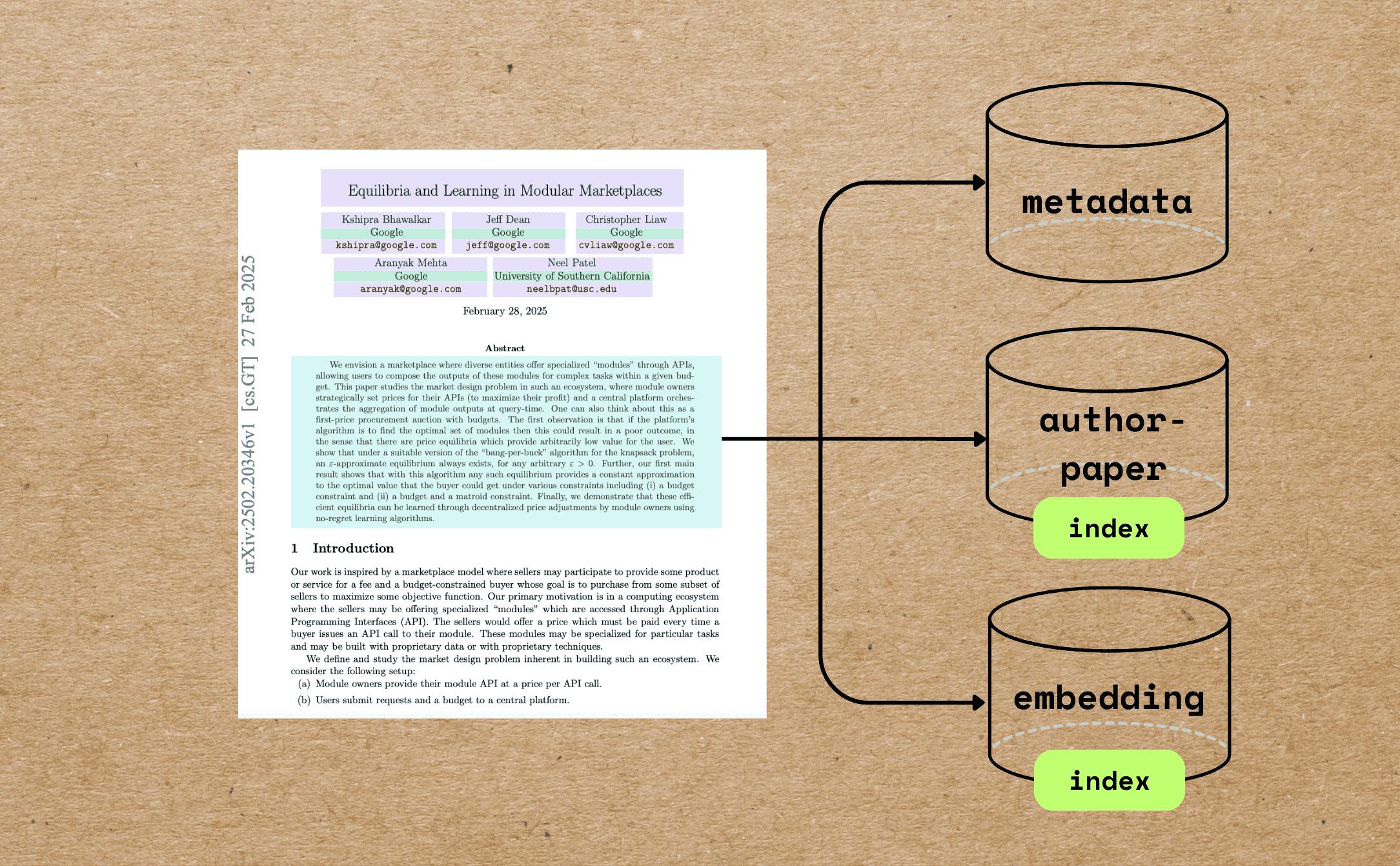
In this blog we will walk through a comprehensive example of indexing research papers with extracting different metadata — beyond full text chunking and embedding — and build semantic embeddings for indexing and querying. ඔබට හැකි නම් අපි ඉතාම ස්තුතිවන්ත වෙනවා ඔයාට මේ tutorial උදව්වෙනවා නම්. ⭐ star GitHub හි CocoIndex GitHub හි CocoIndex Case භාවිතය විද්යාත්මක සෙවීම සහ සොයා ගැනීම, මෙන්ම පර්යේෂණ පදනම්ව AI නියෝජිතයන් කඩදාසි නිර්දේශ පද්ධති පර්යේෂණ දැනුම Graphs Scientific Literature සමිති විශ්ලේෂණය අපිට ලැබෙන දේ අපි මේකට බලමු උදාහරණයක් ලෙස PDF එක මෙන්න අපි ඉටු කිරීමට අවශ් ය දේ: Extract the paper metadata, including file name, title, author information, abstract, and number of pages. Build vector embeddings for the metadata, such as the title and abstract, for semantic search. මෙය වඩා හොඳ මෙටා දත්ත ආකෘති සමිති සෙවුම් ප්රතිඵල ලබා දෙයි. උදාහරණයක් ලෙස, ඔබ මාතෘකාව හා අමුද්රව්ය සමග ටෙක්ස් ප්රශ්න අනුකූල කළ හැකිය. Build an index of authors and all the file names associated with each author to answer questions like "Give me all the papers by Jeff Dean." If you want to perform full PDF embedding for the paper, you can also refer to . this article ඔබට සම්පූර්ණ කේතය සොයා ගත හැකිය . මෙතන මෙම ලිපිය ඔබට ප්රයෝජනවත් නම්, කරුණාකර අපට තරුවක් ⭐ at අපිව වර්ධනය කරන්න උදව් කරන්න. Github මූලික කොටස් PDF Preprocessing Reads PDFs using and extracts: pypdf Total number of pages First page content (used as a proxy for metadata-rich information) Markdown Conversion Converts the first page to Markdown using . Marker LLM-Powered Metadata Extraction Sends the first-page Markdown to GPT-4o using CocoIndex's function. ExtractByLlm Extracted metadata includes and more. (string) title (with name, email, and affiliation) authors (string) abstract Semantic Embedding The title is embedded directly using the model by the SentenceTransformer. all-MiniLM-L6-v2 Abstracts are chunked based on semantic punctuation and token count, then each chunk is embedded individually. Relational Data Collection Authors are unrolled and collected into an relation, enabling queries like: author_papers Show all papers by X Which co-authors worked with Y? කොන්දේසි . Install PostgreSQL CocoIndex uses PostgreSQL internally for incremental processing. . Configure your OpenAI API key විකල්පයක් ලෙස, අපි Gemini, Ollama, LiteLLM, Checkout සඳහා දේශීය සහාය ඇත. . මාර්ගෝපදේශ ඔබ ඔබේ ප්රියතම LLM සැපයුම්කරු තෝරා ගත හැකි අතර සම්පූර්ණයෙන්ම ස්ථානයේ වැඩ කළ හැකිය. Indexing Flow ක් රමය මෙම ව්යාපෘතිය සැබෑ ලෝකයේ භාවිත ප්රවණතා වලට වඩා සමීපව මෙටා දත්ත තේරුම් ගැනීම සඳහා ටිකක් වඩා සම්පූර්ණ උදාහරණයක් පෙන්වයි. ඔබ CocoIndex විසින් මෙම නිර්මාණ 100 රේඛා ඇතුළත සාර්ථක කර ගැනීමට කොපමණ පහසු බව ඔබට පෙනේවි - . කේතය අපි ඇවිදින්නේ කුමක්ද යන්න ඔබට වඩා හොඳින් ප්රවේශ කිරීමට ඔබට උපකාර කිරීම සඳහා, මෙහි ක්රියා පද්ධතියකි. PDF වල ලියවිලි ලැයිස්තුවක් ඇතුලත් කරන්න. For each file: Extract the first page of the paper. Convert the first page to Markdown. Extract metadata (title, authors, abstract) from the first page. Split the abstract into chunks, and compute embeddings for each chunk. Export to the following tables in Postgres with PGVector: Metadata (title, authors, abstract) for each paper. Author-to-paper mapping, for author-based query. Embeddings for titles and abstract chunks, for semantic search. පියවර වලදී zoom කරන්න. කඩදාසි ආනයනය @cocoindex.flow_def(name="PaperMetadata") def paper_metadata_flow( flow_builder: cocoindex.FlowBuilder, data_scope: cocoindex.DataScope ) -> None: data_scope["documents"] = flow_builder.add_source( cocoindex.sources.LocalFile(path="papers", binary=True), refresh_interval=datetime.timedelta(seconds=10), ) සංකේතය සංකේතය සංකේතය සංකේතය සංකේතය ( , ) flow_builder.add_source filename content අපට අදහස් කළ හැකිය The වැඩි විස්තර සඳහා ලේඛන Metadata එකතු කිරීම සහ එකතු කිරීම මූලික තොරතුරු සඳහා මුල් පිටුව පිටපත PDF හි මුල් පිටුව සහ පිටපත් සංඛ්යාව ආකර්ෂණය කිරීම සඳහා පෞද්ගලික කාර්යයක් සකස් කරන්න. @dataclasses.dataclass class PaperBasicInfo: num_pages: int first_page: bytes @cocoindex.op.function() def extract_basic_info(content: bytes) -> PaperBasicInfo: """Extract the first pages of a PDF.""" reader = PdfReader(io.BytesIO(content)) output = io.BytesIO() writer = PdfWriter() writer.add_page(reader.pages[0]) writer.write(output) return PaperBasicInfo(num_pages=len(reader.pages), first_page=output.getvalue()) දැන් මේක ඔබේ stream එකට දාන්න. අපි ප්රතිකාර වියදම් අවම කිරීමට පළමු පිටුව සිට මෙටා දත්ත ඉවත්, මුළු PDF ඉතා විශාල විය හැක. with data_scope["documents"].row() as doc: doc["basic_info"] = doc["content"].transform(extract_basic_info) මෙම පියවරෙන් පසු, ඔබ සෑම පත්රයකටම මූලික තොරතුරු ලබා ගත යුතුය. මූලික තොරතුරු පළමු පිටුව Markdown වෙත පරිවර්තනය කරනු ඇත. විකල්පයක් ලෙස, ඔබ පහසුවෙන් ඔබගේ ප්රියතම PDF පර්සර්, වැනි Docling සම්බන්ධ කළ හැකිය. මාක්ටර් පරිවර්තකය ක්රියාත්මක කිරීම සහ එය සකස් කිරීම, එහි ආරම්භක කිරීම ප්රමාණවත් වේ. එමගින් එකම පරිවර්තකය නැවත විවිධ ආදායම් ගොනු සඳහා භාවිතා කරනු ලැබේ. @cache def get_marker_converter() -> PdfConverter: config_parser = ConfigParser({}) return PdfConverter( create_model_dict(), config=config_parser.generate_config_dict() ) ඒක custom function එකට දාන්න. @cocoindex.op.function(gpu=True, cache=True, behavior_version=1) def pdf_to_markdown(content: bytes) -> str: """Convert to Markdown.""" with tempfile.NamedTemporaryFile(delete=True, suffix=".pdf") as temp_file: temp_file.write(content) temp_file.flush() text, _, _ = text_from_rendered(get_marker_converter()(temp_file.name)) return text එය ඔබේ පරිවර්තනය වෙත යොමු කරන්න with data_scope["documents"].row() as doc: doc["first_page_md"] = doc["basic_info"]["first_page"].transform( pdf_to_markdown ) මෙම පියවරෙන් පසුව, ඔබ Markdown ආකෘතිය තුළ සෑම කඩදාසි පළමු පිටුව තිබිය යුතුය. LLM සමඟ මූලික තොරතුරු ලබා ගන්න CocoIndex සම්ප්රදායිකව සංකීර්ණ හා නඩත්තු පද්ධති සමග LLM-කාර්යක්ෂම ආකෘති ආකෘති ආකෘති සහාය. ඔබ ආකර්ෂණීය පද්ධති ගැන වැඩිදුර ඉගෙන ගැනීමට උනන්දු නම්, පිවිසෙන්න . මෙම ලිපිය @dataclasses.dataclass class PaperMetadata: """ Metadata for a paper. """ title: str authors: list[Author] abstract: str Pull it into the ඇතුළේ ක්රියාකාරිත්වය.Data class defined, CocoIndex automatically will parse the LLM response into the data class. ExtractByLlm doc["metadata"] = doc["first_page_md"].transform( cocoindex.functions.ExtractByLlm( llm_spec=cocoindex.LlmSpec( api_type=cocoindex.LlmApiType.OPENAI, model="gpt-4o" ), output_type=PaperMetadata, instruction="Please extract the metadata from the first page of the paper.", ) ) මෙම පියවරෙන් පසු, ඔබ සෑම කඩදාසි සඳහාම මෙටා දත්ත ලබා ගත යුතුය. කඩදාසි MetaData එකතු කිරීම paper_metadata = data_scope.add_collector() with data_scope["documents"].row() as doc: # ... process # Collect metadata paper_metadata.collect( filename=doc["filename"], title=doc["metadata"]["title"], authors=doc["metadata"]["authors"], abstract=doc["metadata"]["abstract"], num_pages=doc["basic_info"]["num_pages"], ) ඔබට අවශ් ය ඕනෑම දෙයක් එකතු කරන්න :) රැස්වීම දෙකක් තොරතුරු ලේඛකය ෆිල්ම් ලේඛකය ෆිල්ම් මෙහිදී අපි සොයන්න ක්රියාකාරිත්වය ගොඩනඟා ගැනීම සඳහා විශේෂ තැපැල් තුළ Author → Papers එකතු කිරීමට අවශ්ය. ලේඛකයා විසින් පමණක් රැස් කර ඇත. author_papers = data_scope.add_collector() with data_scope["documents"].row() as doc: with doc["metadata"]["authors"].row() as author: author_papers.collect( author_name=author["name"], filename=doc["filename"], ) පරිගණක සහ එකතු කිරීම Title එක doc["title_embedding"] = doc["metadata"]["title"].transform( cocoindex.functions.SentenceTransformerEmbed( model="sentence-transformers/all-MiniLM-L6-v2" ) ) abstract පිලිබඳ කොටස් කොටස් කොටස් කොටස් කොටස් කොටස් කොටස් කොටස් කොටස් කොටස් කොටස් කොටස් කොටස් කොටස් කොටස් කොටස් කොටස් කොටස් කොටස් කොටස් කොටස් කොටස් කොටස් කොටස් කොටස් කොටස් කොටස් කොටස්. සමහර වෙලාවට abstract එක දිගු වෙන්නත් පුළුවන්. doc["abstract_chunks"] = doc["metadata"]["abstract"].transform( cocoindex.functions.SplitRecursively( custom_languages=[ cocoindex.functions.CustomLanguageSpec( language_name="abstract", separators_regex=[r"[.?!]+\s+", r"[:;]\s+", r",\s+", r"\s+"], ) ] ), language="abstract", chunk_size=500, min_chunk_size=200, chunk_overlap=150, ) මෙම පියවරෙන් පසු, ඔබ සෑම කඩදාසි කොටස් අමුද්රව්ය විය යුතුය. සෑම කොටසක්ම එකතු කරන්න සහ ඔවුන්ගේ ආකෘති එකතු කරන්න. with doc["abstract_chunks"].row() as chunk: chunk["embedding"] = chunk["text"].transform( cocoindex.functions.SentenceTransformerEmbed( model="sentence-transformers/all-MiniLM-L6-v2" ) ) මෙම පියවරෙන් පසු, ඔබ සෑම කඩදාසි කොටුවක අමුද්රව්ය කොටස් ඇතුළත් කළ යුතුය. Embeddings එකතු කිරීම metadata_embeddings = data_scope.add_collector() with data_scope["documents"].row() as doc: # ... process # collect title embedding metadata_embeddings.collect( id=cocoindex.GeneratedField.UUID, filename=doc["filename"], location="title", text=doc["metadata"]["title"], embedding=doc["title_embedding"], ) with doc["abstract_chunks"].row() as chunk: # ... process # collect abstract chunks embeddings metadata_embeddings.collect( id=cocoindex.GeneratedField.UUID, filename=doc["filename"], location="abstract", text=chunk["text"], embedding=chunk["embedding"], ) විකුණුම් අවසාන වශයෙන්, අපි දත්ත Postgres වෙත ප්රවාහන කරමු. paper_metadata.export( "paper_metadata", cocoindex.targets.Postgres(), primary_key_fields=["filename"], ) author_papers.export( "author_papers", cocoindex.targets.Postgres(), primary_key_fields=["author_name", "filename"], ) metadata_embeddings.export( "metadata_embeddings", cocoindex.targets.Postgres(), primary_key_fields=["id"], vector_indexes=[ cocoindex.VectorIndexDef( field_name="embedding", metric=cocoindex.VectorSimilarityMetric.COSINE_SIMILARITY, ) ], ) මෙම උදාහරණයේදී අපි PGVector භාවිතා කරන්නේ embedding stores/ CocoIndex සමඟ, ඔබ Qdrant වැනි අනෙකුත් සහාය වන Vector දත්ත බැංකු මත එක් රේඛාවක් විවෘත කළ හැකිය. වැඩි විස්තර සඳහා මාර්ගෝපදේශ අපි ඉලක්ක කරමු පරිගණක සම්මත කිරීම සහ එය LEGO ගොඩනැගිල්ලක් බවට පත් කිරීම. CocoInsight පියවරෙන් පියවරක් ඔබ පියවරෙන් පියවරෙන් ව්යාපෘතිය හරහා ගමන් කළ හැකිය දකින කොකේස් සෑම ක්ෂේත් රයක්ම ඉදිකරන ආකාරය සහ වේදිකාව පිටුපස සිදුවන දේ. INDEX අවශ්යතා ඔබට මෙම කොටස වෙත යොමු කළ හැක ගැන ලිඛිත Embeddings How to build query against embeddings ප්රශ්න ගොඩනැගීම දැනට CocoIndex අතිරේක ප්රශ්න පරිගණකය සපයන්නේ නැත.We can write SQL or rely on the query engine by the target storage. බොහෝ දත්ත සමුදායන් දැනටමත් ඔවුන්ගේම හොඳම ක්රියාකාරකම් සමඟ ප්රශ්න යෙදුම් optimized කර ඇත. ප්රශ්න අභ්යන්තරය ප්රශ්න, rearanking සහ අනෙකුත් සෙවුම් සම්බන්ධ ක්රියාකාරකම් සඳහා විශිෂ්ට විසඳුම් ඇත. ඔබ ප්රශ්නය ලිවීමට උපකාර අවශ්ය නම්, කරුණාකර අප අමතන්න . විරුද්ධව අපට සහාය අපි දිගින් දිගටම වැඩි දියුණු වෙනවා, තව විශේෂාංග සහ උදාහරණ ඉක්මනින් එනවා. මෙම ලිපිය ඔබට ප්රයෝජනවත් නම්, කරුණාකර අපට තරුවක් ⭐ at අපිව වර්ධනය කරන්න උදව් කරන්න. Github කියවන්න ස්තුතියි!